
Limit a method to some countries or states
Choose where a rule applies: one country, everywhere except some countries, the lower 48 states, or a list of states and provinces.
Before you begin
Steps
- Go to Shipping Rules and select Edit on the rule (or Add a shipping rule).
- In the Where it ships card, set Country and States / provinces as in the tables below.
- Select Save Rule.
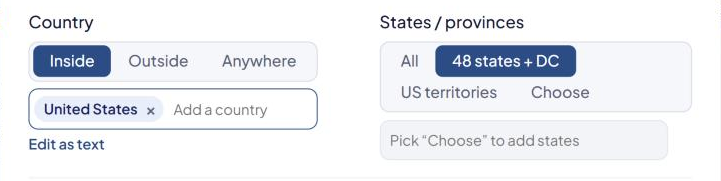
Country
| Choice | The rule applies |
|---|---|
| Inside + countries | Only to the countries you add |
| Outside + countries | Everywhere except the countries you add |
| Anywhere | To every country |
States / provinces
| Choice | The rule applies |
|---|---|
| All | To every state and province |
| 48 states + DC | To the contiguous 48 states and Washington DC (not Alaska, Hawaii or territories) |
| US territories | To American Samoa, Guam, Micronesia, Marshall Islands, Northern Mariana Islands, Palau, Puerto Rico, US Virgin Islands and the Canal Zone |
| Choose + states | Only to the states and provinces you add |
With Choose you can add US states and Canadian, Mexican, Australian and French regions, plus UK regions on Shopify. The list only offers states of the countries the rule covers: with Inside, Canada, you see Canadian provinces only.
How Country and States work together
States / provinces can only narrow down the countries in Country, so the form keeps the two in step:
| You do this | The form does this |
|---|---|
| Select 48 states + DC or US territories | Sets Country to Inside, United States only. These choices cover the US, nothing else. |
| Change Country so the United States isn't the only country left (add Canada, pick Outside or Anywhere) | Switches States / provinces back to All. |
| Change Country so some chosen states are no longer in it | Removes those states. |
| Pick countries that have no states to choose (for example Inside, Germany) | Turns off Choose and switches to All. |
Each time, a short orange note under States / provinces says what changed. To cover the lower 48 states and Canada in one rule, select Choose and add the states and provinces you want, or make two rules with the same Method name.
Examples
| Goal | Country | States / provinces |
|---|---|---|
| Lower 48 only | Inside, United States | 48 states + DC |
| International only | Outside, United States | All |
| US and Canada | Inside, United States and Canada | All |
| West Coast only | Inside, United States | Choose: California, Oregon, Washington |
Excluding a few states
There's no "except" option for states. Either:
- Select Choose and add every state you do ship to, or
- Split the method into rules with the same Method name, one per area. See Charge a different rate for Alaska and Hawaii.
To stop one product shipping to some states or countries, use the product's Exclude states or Exclude countries instead. See Stop a product shipping by some methods or to some places.
If the rule won't save
| Message | What to do |
|---|---|
| "Please select the countries relevant for this rule" | You picked Inside or Outside but added no country. |
| "Please select the states / provinces relevant for this rule" | You picked Choose but added no state. |
| "This rule never matches an order: …" | Country and States / provinces don't overlap, so no address can match, for example Outside, United States with 48 states + DC. Change one of them as the message says. |
Rules saved before the form kept them in step
Older rules can have a Country and States / provinces that don't fit, so some or all addresses never match. On the Shipping Rules and Markups pages, their cards show an orange line such as "Only matches US orders: "48 states + DC" only covers the United States. Edit to fix." Select Edit: where the fix keeps the rule matching the same addresses, the form makes it for you and says so. Check it and select Save Rule.
Check that it works
In the Shipping Estimator, test one address inside the area and one outside. See Test your rates with the Shipping Estimator.