
The Carrier Status page
The Carrier Status page answers two questions: is each carrier answering right now, and is your own account with it working? Check it first when a carrier's rates go missing.
Where to find it
- Menu: Dashboard → Carrier Status.
- Dashboard: the Carrier status card shows a row of carrier tiles. When they don't all fit, select View all your carriers →.
- Settings → Carriers: select Carrier Status → above the carrier tiles.
- A Dashboard notice such as "UPS isn't answering right now." has a Carrier status → link.
How ASM knows
UPS, FedEx, USPS and Estes get a test quote from ASM every minute. Every other carrier is judged from real quotes across all ASM stores: it shows Down when quotes from several stores fail with none succeeding for 10 minutes, and Up again as soon as a quote succeeds. Errors about one store's own details, like a ZIP code the carrier doesn't recognize or a rejected login, don't count toward Down; they show under Problems with your account for that store. The page refreshes itself every minute, and the summary shows when it was last checked (in Central time).
The summary
The bar at the top tells you the most important thing first:
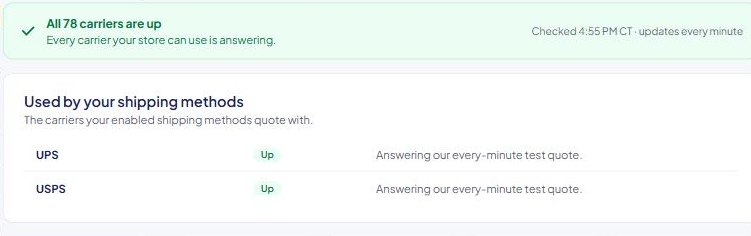
- "All N carriers are up" — every carrier your store can use is answering.
- "1 carrier is down" — and whether your shipping methods use it. If they do, its rates may not show at checkout until it recovers. If not, your checkout isn't affected.
- "{Carrier} is failing for your store" — the carrier is up for other stores, so the problem is most likely your own account.
The sections
Problems with your account Carriers whose recent quotes for your store failed. Each row shows the problem, the carrier's own message, when it last failed and when it last quoted successfully, and a Check your {Carrier} details → link to its card. See A carrier says "Check account".
Down Carriers that aren't answering anyone right now. Each says whether your shipping methods use it.
Used by your shipping methods The carriers your enabled shipping methods quote with, and how each is doing.
Available, not used yet Carriers your store can rate with, but no enabled method uses. Hover over one for details.
Recent errors Checkout quotes that failed in the last 7 days, by carrier. Each error is listed once, with how many checkouts got it and when it last happened (in Central time). Errors you may need to act on come first, such as Login rejected or Account setup; a carrier with one of those has a Check your {Carrier} details → link.
Errors that usually need nothing from you are folded under Usually nothing to fix. Select it to see them:
- Route not served: a ZIP code or address the carrier doesn't serve, often a typo by the shopper.
- No reason given: the carrier didn't answer in time, or gave no reason.
- Every USPS error: all stores get USPS rates through ASM's own USPS account, so there's nothing to change on your side.
If a carrier stops quoting for your store altogether, it also shows under Problems with your account, whatever the error.
Open an error to see its latest checkouts: when, the ship-to address and the items. Explain replays one of those checkouts now, as an estimate, and shows which methods it would get today and why each missing method isn't offered. It uses live carrier quotes but nothing is logged or charged, and today's answer can differ if your rates, rules or the carrier changed since.
Backup rates used Shown when your store has a backup rate. It lists, by method, the checkouts in the last 7 days where the carrier couldn't answer and the backup quoted instead, with the carrier's error. See Keep a method at checkout when its carrier is down.
The badges
- Up — the carrier is answering ASM.
- Down — the carrier isn't answering, for several stores at once.
- Check account — the carrier is answering others, but quotes for your store are failing. Red means a login or account problem. Amber means repeated errors or no rate for your store in a while.
Good to know
- "Up" doesn't prove your login works. It means the carrier is answering ASM in general. That's what Check account is for.
- A carrier only your store uses can't show as Down. If it fails, it shows as Check account instead.
- Statuses never stop ASM from asking a carrier. Even when a carrier shows Down, ASM keeps quoting it, so rates come back as soon as it recovers.
- A passing Test connection clears Check account for that carrier right away. See Test a carrier connection.
If the page says "Carrier statuses couldn't be loaded right now.", wait a few minutes and reload.