
Charge a flat rate
Charge a price you set instead of a live carrier rate: a fixed amount, an amount per product or per pound, or a percentage of the order.
Before you begin
Steps
- Go to Shipping Rules and select Add a shipping rule.
- In Basics, type the Method name, for example
Standard Shipping. - In Where it ships, choose the countries and states. See Limit a method to some countries or states.
- In How it's priced, select Percentage or flat.
- Fill in one or more of the boxes below.
- Select Save Rule.
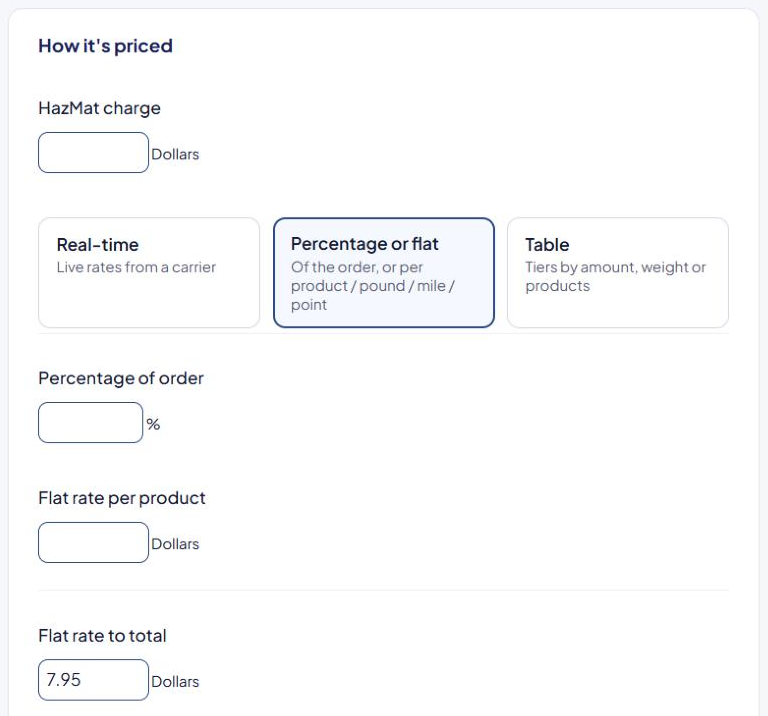
The boxes
Every box you fill in is added together. Leave the others empty.
| Box | What it charges | Example |
|---|---|---|
| Percentage of order | A percentage of the products' value | 10 on an $80 order = $8.00 |
| Flat rate to total | A fixed amount for each packed box | 7.95 = $7.95 for a one-box order |
| Flat rate per product | An amount for each unit in the cart | 2 with 3 units = $6.00 |
| Flat rate per Pound | An amount for each pound (or your weight unit) | 1.50 on a 6 lb cart = $9.00 |
Most orders pack into one box. When a cart needs several boxes, each box is priced and the boxes are added together, so a Flat rate to total is charged once per box. See My table rate is charged two or three times.
If your store uses the Distance or Points extension, you also see Flat rate per mile and Flat rate per point.
Combining boxes
Percentage of order 10 and Flat rate to total 5, on an $80 order:
- 10% of $80 = $8.00
- plus $5.00
- shopper pays $13.00
ASM packs the cart into boxes before pricing. If your orders often pack into more than one box, test a multi-box cart in the Shipping Estimator to confirm the total is what you expect.
Common variations
- Free over an amount — add Free shipping over in the Free shipping card. See Offer free shipping over an order amount.
- A different price for some states — add a second rule with the same Method name. See Charge a different rate for Alaska and Hawaii.
- A fixed price for one product — use the product's Flat ship rates instead. See Free or flat shipping for a product.
If the rule won't save
"Please enter the values you wish to calculate shipping with…" means every box is empty. Fill in at least one. To charge nothing, type 0 in Flat rate to total.
Check that it works
Run a test cart in the Shipping Estimator and compare the price with your own math. See Test your rates with the Shipping Estimator.